

Updated: 21.10.2026
What is a backlink audit?
A backlink audit is a thorough analysis of all the links pointing to your website from external sources. It checks which backlinks help your authority and rankings, which are spam or lost, and what to fix. Think of it as a health checkup for your backlink profile; SEOs also call it a link audit.
How to do a backlink audit in 6 steps
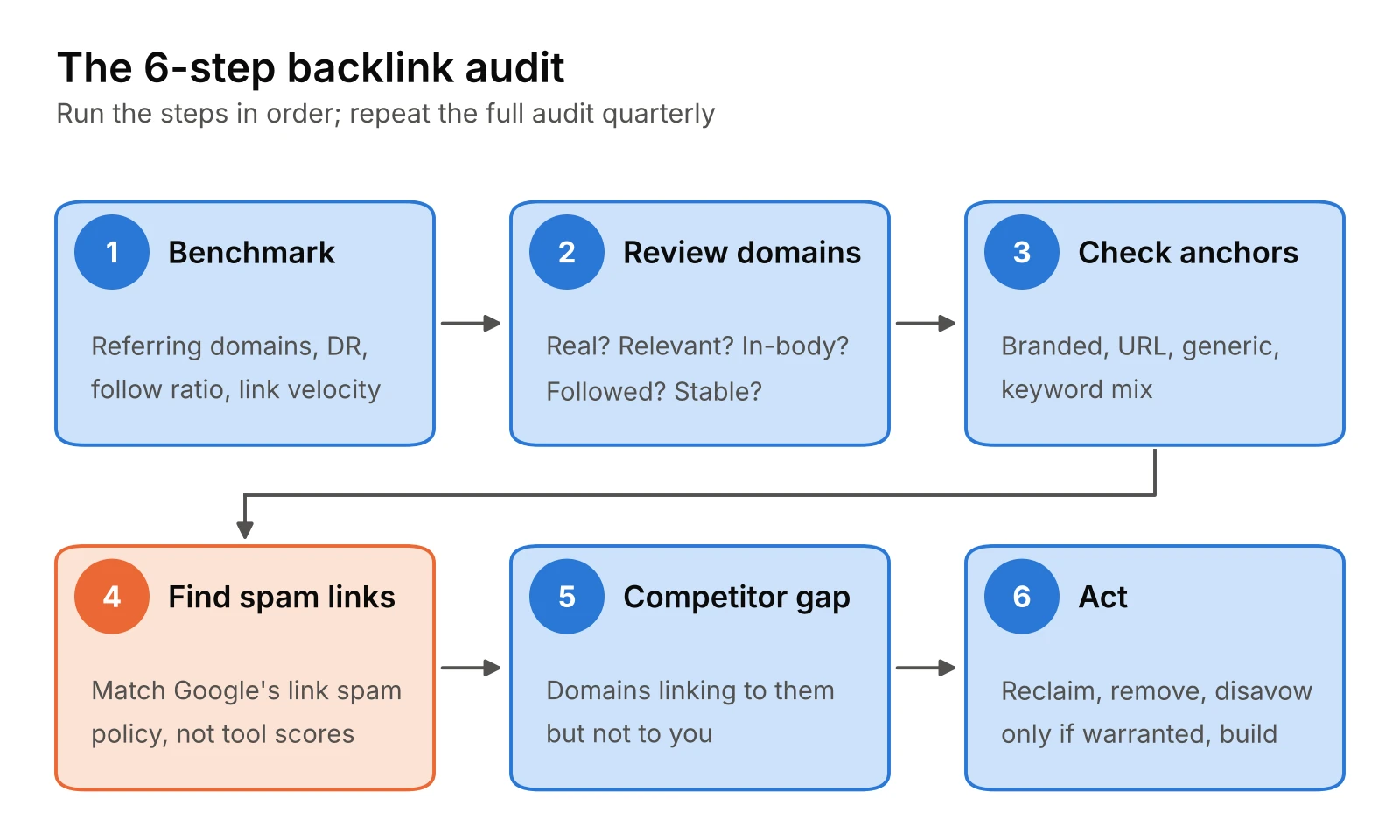
- Benchmark your backlink profile: record referring domains, backlinks, Domain Rating, follow ratio and link velocity.
- Review referring domains and link quality: check authority, relevance, placement and follow status.
- Check anchor text distribution: look for a natural mix of branded, URL, generic and keyword anchors.
- Find spam and manipulative links: flag patterns that match Google’s link spam policy, not just low tool scores.
- Compare against competitors: find domains that link to them but not to you.
- Act on what you found: reclaim lost links, remove or disavow only where warranted, and close the gaps.
A backlink audit, or SEO link audit, tells you whether the links pointing at your site are building authority or quietly working against you. This guide walks through the six steps I use on client sites and on our own, which tools to run each step in, and when to leave a bad-looking link alone.
Why Run a Backlink Audit
Backlinks work as votes of confidence: when reputable, relevant sites link to you, search engines treat your pages as more trustworthy. Not every link counts equally, and a few patterns of manipulative linking can still lead to a manual action. An audit shows you which is which.
A regular link audit helps you:
- Spot real problems early: paid or automated link patterns, or a sudden spam wave, before they turn into a manual action.
- Reclaim lost value: links that broke, were removed, or point at pages that now return 404.
- See what earns links: which of your pages and content formats attract the best domains. Links also feed answer-engine visibility, not just rankings.
- Find gaps: domains that link to competitors and not to you.
- Track progress: a baseline you can compare against next quarter.
How often should you do a backlink audit?
Split it into a quick check and a full audit:
| Audit type | How often | What it covers | Time |
|---|---|---|---|
| Quick check | Monthly | New and lost referring domains, anchor text spikes, any manual action notice in Search Console | About 15 minutes |
| Full audit | Quarterly | All six steps below, plus a written report | Half a day for most B2B sites |
| Event-driven audit | When it happens | After a sudden ranking drop, before and after a site migration, when you take over a new site | Same as a full audit |
Taking over a site is the most important trigger. It shows you exactly what you inherited before you build anything on top of it. Because link health shapes which commercial keywords you can win, pair the audit with keyword mapping, the way we do in our B2B SEO services.
The 6-Step Link Audit Process
Run the steps in order. Each one feeds the next, and the checklist download has a tab for each.
Step 1: Benchmark your backlink profile
Start with a snapshot so you can measure change later. Record:
- Referring domains (more useful than the raw backlink count)
- Total backlinks
- Domain Rating (Ahrefs) or Authority Score (Semrush) or Domain Authority (Moz)
- Share of followed vs nofollow links
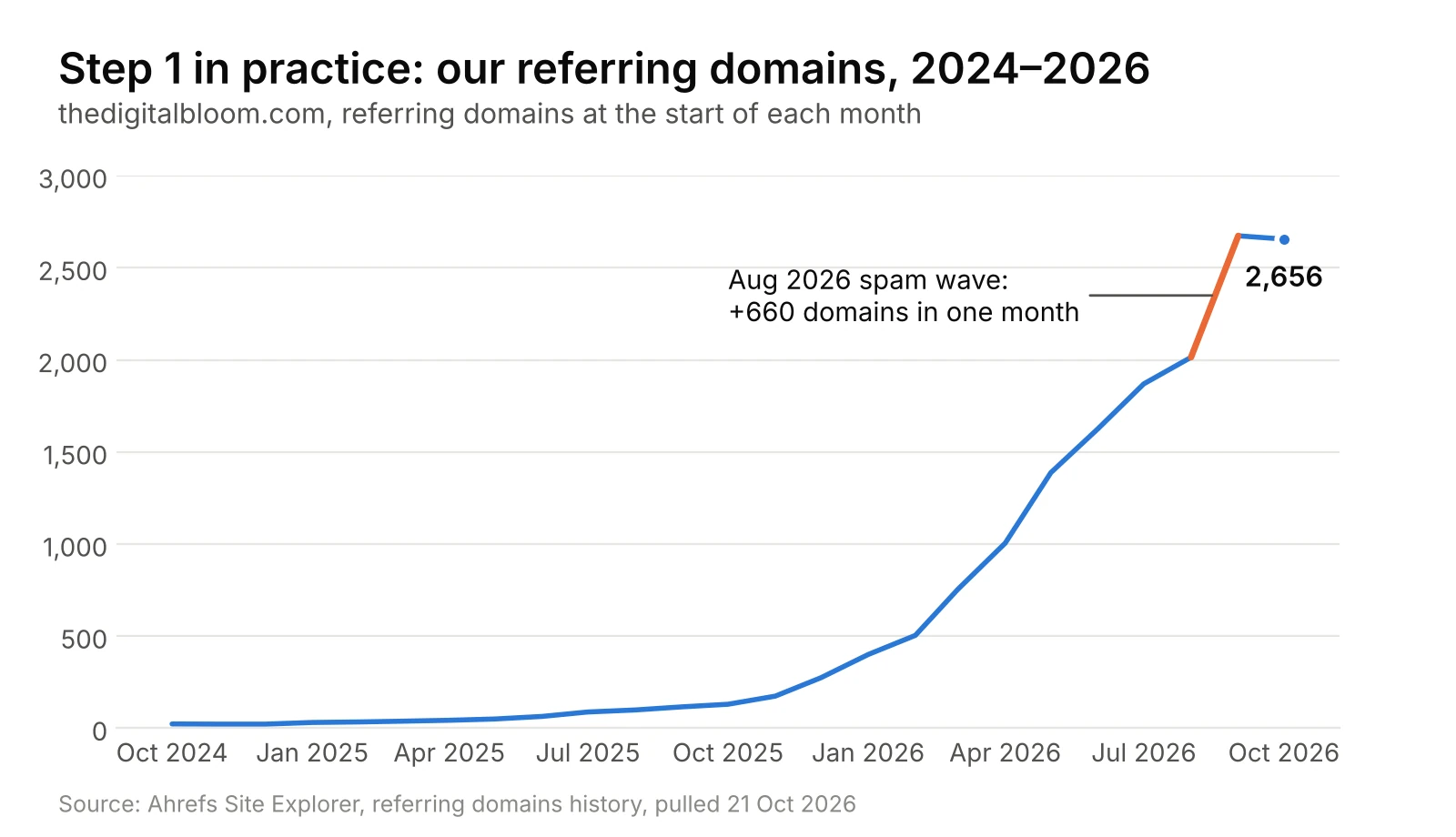
- Link velocity: new and lost referring domains per month over the last 12 months
Note anything unusual. A flat line followed by a jump of hundreds of new domains in one month is the first thing to explain in step 4. Here is what that looks like on our own site:
Step 2: Review referring domains and link quality
Work at the domain level first, then look at individual links from the domains that matter. For each referring domain, ask:
- Is it real? Does the site have its own traffic, authors and content, or does it exist only to host links?
- Is it relevant? A link from a site in your industry or a neighbouring one beats a stronger but unrelated site.
- Where is the link? A link inside the body of an article carries more weight than a footer, sidebar or comment link.
- Is it followed? Nofollow, sponsored and UGC links still send traffic and signal mentions, but pass less ranking value.
- Is it stable? Links that have survived for years are rarely a problem.
A healthy profile has many unique, relevant domains, not many links from a few.
Step 3: Check anchor text distribution
Anchor text is the clickable text of a link, and it tells search engines what the target page is about. Sort your anchors into five groups:
- Branded: your company name, such as “The Digital Bloom”
- Naked URL: the address itself, such as “thedigitalbloom.com”
- Generic: “click here”, “this guide”, “source”
- Keyword: contains a target phrase, such as “backlink audit guide”
- Image: the alt text of a linked image
Most natural profiles are led by branded, URL and generic anchors. A profile where exact-match commercial keywords dominate is a pattern worth investigating, because optimized anchors in guest posts and press releases are a listed example in Google’s link spam policy.
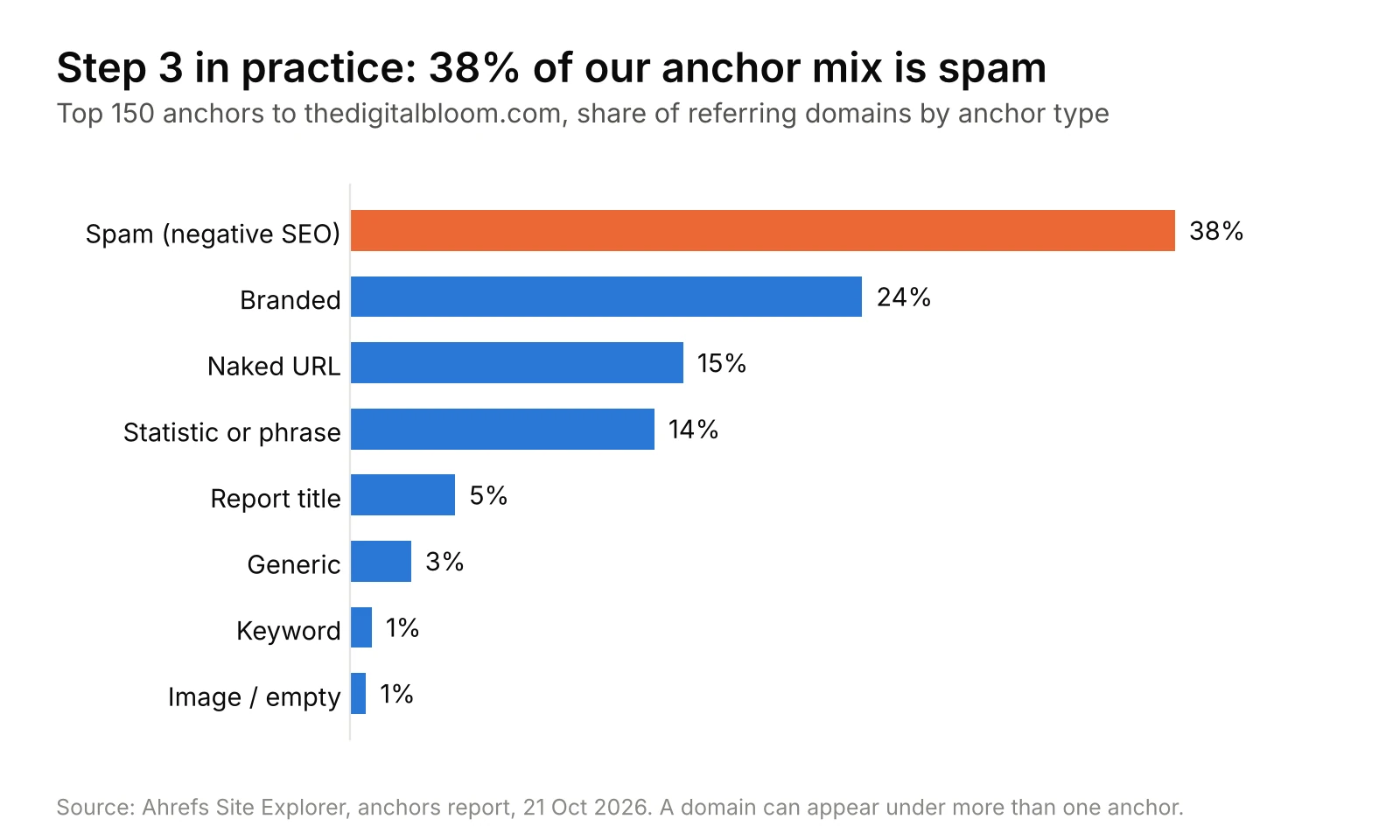
Our own profile shows why the mix matters more than any single link. After the spam wave, spam anchors make up 38% of our top-150 anchor mix, while keyword anchors are just 1%:
Step 4: Find spam and manipulative links
Look for patterns, not single scores. The red flags below map to the examples in Google’s link spam policy:
- Links you or a previous agency paid for, or traded goods or services for, without rel=”sponsored” or nofollow
- Large-scale link exchanges or partner pages built only to cross-link
- Links created by automated programs: comment, profile and forum signature spam
- Low-quality directory and bookmark sites
- Keyword-rich links in widgets, footers or templates spread across many sites
- A sudden spike of new domains with unrelated topics, foreign languages or identical anchors (a common sign of a negative SEO attack)
Document what you find in the checklist’s Domain review tab and mark each domain Keep, Watch, Remove or Disavow. Before you mark anything Disavow, read when to disavow below; most flagged links need no action.
Step 5: Compare against competitors
Pick three to five sites that rank for your main terms. Compare their referring domains, link velocity and most-linked pages against yours, then:
- List domains that link to two or more competitors but not to you. These are your warmest outreach targets.
- Note which content types earn them links: original data, tools, templates or opinion pieces.
- Check whether their link growth is steady or bursty. Bursty growth often means a campaign you can learn from.
Ahrefs Link Intersect and Semrush Backlink Gap both do this in one report.
Step 6: Act on what you found
Turn the audit into a short action list, in this order:
- Reclaim lost links. Redirect any linked URL that now returns 404 to the closest live page with a 301. For valuable links that point to a wrong or old URL, ask the site owner to update them.
- Remove what you can. For links you or a past vendor built that break Google’s policy, email the site owner and ask for removal or a nofollow. Keep a record of each request.
- Disavow only where warranted. See the next section for when that is.
- Build where the gaps are. Pitch the competitor-gap domains from step 5 and create more of the content that already earns you links. If your statistics pages attract the most links, publish more original data.
- Balance anchors over time. If keyword anchors dominate, let future links lean branded and generic rather than chasing removals.
- Log everything. Fill in the report template with this quarter’s numbers and actions, so the next audit starts from a baseline.
Backlink Audit Tools: How to Run the Audit in Each One
No single tool sees every link, so use Search Console plus one paid index. Here is how to run the six steps in each.
| Tool | Best for | Flags spam links? | Cost |
|---|---|---|---|
| Google Search Console | What Google itself has found; manual action alerts | No | Free |
| Ahrefs | Largest index, link velocity, lost and broken links | No, by design | Paid; free for your own verified site via Ahrefs Webmaster Tools |
| Semrush Backlink Audit | A guided keep / remove / disavow workflow | Yes: Toxicity Score 0–100 | Paid |
| Moz Link Explorer | A second opinion on domain quality | Yes: Spam Score % | Paid, limited free use |
Google Search Console
Search Console is the only source that shows links from Google’s own index, and the only place you will see a manual action. Open Links in the left menu:
- External links > Top linking sites: your referring domains, sorted by link count. Scan for domains you don’t recognize (steps 2 and 4).
- Top linking text: your anchor text distribution (step 3).
- Top linked pages: which of your pages earn links, and which sites link to each one.
- Export > Latest links: up to 100,000 of the most recently discovered links, sorted by date. Use it to spot a sudden spike (step 1).
- Security & Manual actions > Manual actions: check this on every audit. “No issues detected” is the answer you want.
Limits to know: on-screen tables stop at 1,000 rows, the report is a sample rather than every link, it may still list links that were since removed, and it doesn’t say which links are nofollow (Google’s Links report help).
Ahrefs
Ahrefs has one of the largest link indexes, so it usually surfaces links Search Console misses. Enter your domain in Site Explorer:
- Overview: note Domain Rating, referring domains and the referring domains chart. A sharp jump in the chart is your link velocity flag (step 1).
- Referring domains: sort by DR, filter to dofollow, and switch to New or Lost to see recent changes (steps 1 and 2).
- Anchors: the anchor distribution with referring domain counts (step 3).
- Broken backlinks: links pointing at your pages that now return 404. These are your fastest reclaim wins (step 6).
- Competitive Analysis > Link Intersect: enter your domain and up to 10 competitors to list domains that link to them but not to you (step 5).
Ahrefs deliberately doesn’t score links as “toxic”. Its help centre points to Google’s disavow conditions instead and offers a Best links filter to hide links you want to ignore across reports (Ahrefs help). You judge step 4 yourself, which is no bad thing.
Semrush Backlink Audit
Semrush’s Backlink Audit is built as a workflow: score, review, sort into lists, export. Setup takes four steps (scope, brand names, site categories, target countries) inside a project.
- Connect Google Search Console and Google Analytics from the tool’s integrations. Search Console adds links Semrush’s crawler missed; a verified property owner adds the tool’s backlink audit email address as a Full user. Analytics shows which linked pages actually send traffic (Semrush: connecting Google accounts).
- Overview: your overall Toxicity Score and the main insights.
- Audit tab: links sorted by Toxicity Score from 0 (good) to 100. Hover a score to see which of the 45+ toxic markers triggered it (Semrush KB).
- Sort each domain into Whitelist, Remove or Disavow. The Remove list drives outreach emails; the Disavow list exports a ready .txt file.
- Backlink Gap (separate tool) covers step 5.
Treat the Toxicity Score as a review queue, not a verdict. Several markers flag things like a linking site’s dropped rankings, which say little about whether the link breaks Google’s policy.
Moz Link Explorer
Moz is useful as a second index and for its Spam Score. Enter your domain in Link Explorer:
- Overview: Domain Authority, linking domains and inbound links (step 1).
- Linking Domains: sort by Domain Authority or Spam Score (steps 2 and 4).
- Anchor Text: anchors by linking domain count (step 3).
- Discovered and Lost: new and lost links over time (steps 1 and 6).
Spam Score is the percentage of sites with similar features that Moz found penalized or banned by Google; Moz is clear that a high score does not mean the site is spam. Moz bands it as low (1–30%), medium (31–60%) and high (61–100%). Use it to decide which domains to look at by hand, not which to disavow.
Spam Links and Disavow: When to Act and When to Ignore
Most “toxic” links need no action. “Toxic” is a label invented by SEO tools, not a Google term. Google’s own guidance says that in most cases it can assess which links to trust without help, so most sites will never need the disavow tool. For links from known spam sites, Google says it typically ignores them (Disavow links help, Links report help).
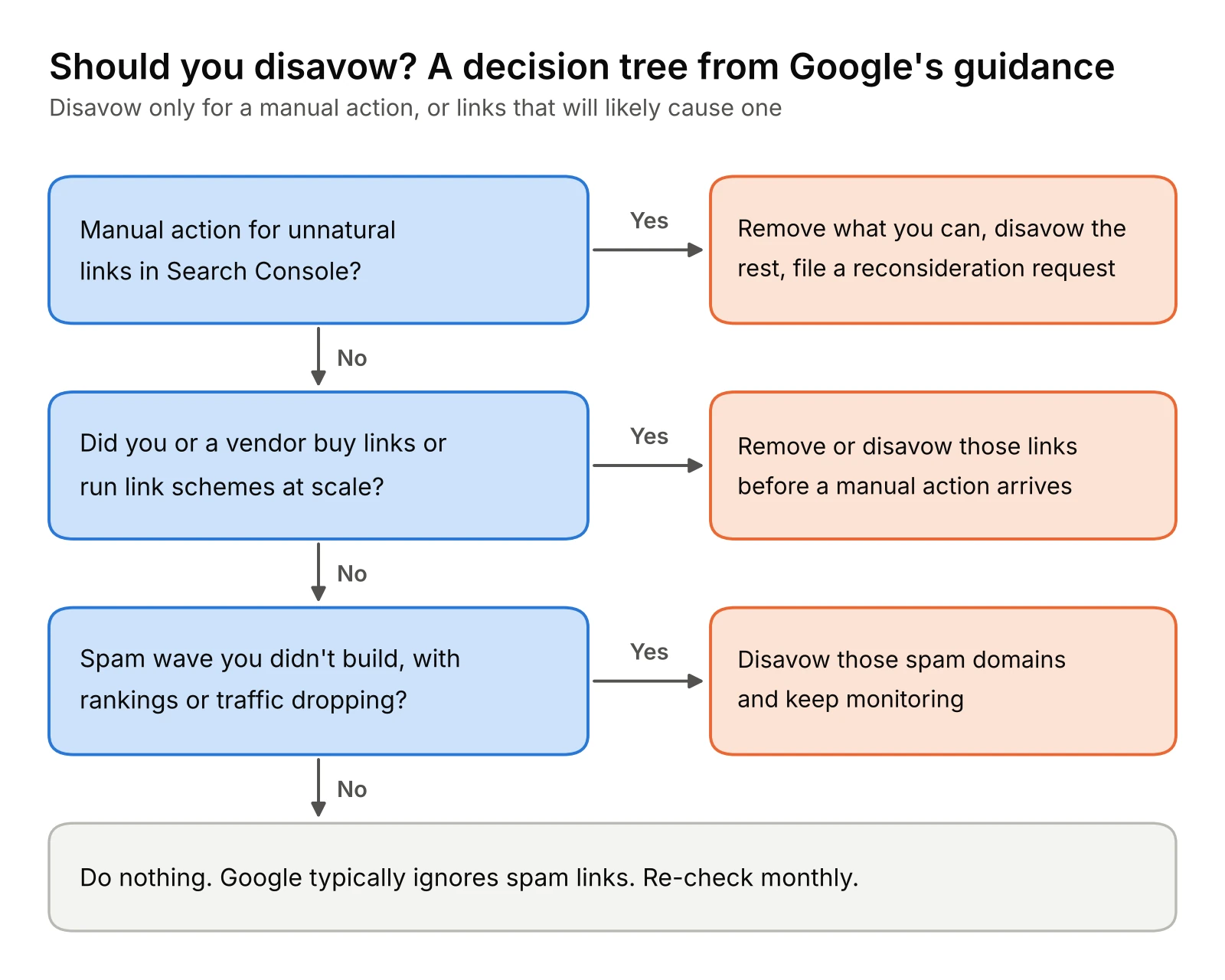
Google says to disavow only when both are true:
- You have a considerable number of spammy, artificial or low-quality links pointing to your site, and
- Those links have caused a manual action, or likely will.
Ahrefs tested the opposite approach in 2024: it disavowed every “toxic” and “potentially toxic” link a well-known tool reported for three of its own blog posts, and concluded it basically did nothing (Ahrefs). The bigger risk runs the other way: disavowing links a tool mislabels can remove value you were getting.
| Situation | What to do |
|---|---|
| Manual action for unnatural links in Search Console | Remove what you can, disavow the rest, then file a reconsideration request |
| You or a past agency bought links or ran link schemes at scale | Remove or disavow those links before a manual action arrives |
| A sudden wave of spam domains you didn’t build (negative SEO) | Monitor rankings and Search Console; disavow only if rankings or a manual action show impact |
| A handful of low-quality or scraper links | Ignore them |
| A tool flags links as “toxic” with no policy pattern behind it | Review by hand; usually ignore |
How to build and submit a disavow file
Google’s format rules (source):
- One URL or domain per line. Use
domain:example.comto disavow a whole domain or subdomain. You can’t disavow a subpath such as example.com/en/. - A plain .txt file, UTF-8 or 7-bit ASCII, at most 100,000 lines (blank and comment lines included) and 2MB. URLs can be up to 2,048 characters.
- Lines starting with # are comments and are ignored. Use them to date each batch.
- One list per property. Uploading a new file replaces the old one, so always add to your existing list rather than uploading only the new domains.
- The tool doesn’t support Domain properties. Upload to a URL-prefix property, and to each of http and https if you have both.
- It can take a few weeks to take effect, and disavowed links keep showing in the Links report.
# Disavow file for example.com, updated 2026-10-21 # Paid links from 2023 campaign, removal requests ignored domain:paid-links-network.example http://spam.example.com/stuff/paid-links.html
Upload it at the disavow links tool page. Keep a copy with your audit report.
Common Backlink Audit Mistakes
- Disavowing on a tool score alone. Toxicity and spam scores are prompts to look, not verdicts. Check the linking page yourself before acting.
- Writing off weak domains. A new, low-authority site in your niche can be a perfectly natural link, and it may grow.
- Treating every keyword anchor as spam. Editors use descriptive anchors naturally. The problem is a pattern of exact-match commercial anchors across many sites.
- Ignoring lost and broken links. Reclaiming a link that already exists is far easier than earning a new one.
- Judging only domain metrics. Page relevance and where the link sits often matter more than DR or DA.
Advanced Checks for Larger Sites
- Segment by content type. Group links by the type of page they point to (guides, data reports, tools, service pages). It shows which formats earn links and where to invest. When link growth doesn’t turn into pipeline, a B2B digital marketing consultant can tie content performance to revenue.
- Check geography. If you sell into specific markets, see whether your referring domains come from them.
- Read the surrounding text. Search engines use the words around a link for context, not just the anchor.
- Compare historical snapshots. Set this quarter’s report against the last one to catch slow drifts a single audit misses.
Free Backlink Audit Checklist and Report Template
One workbook that takes you from a raw link export to a finished report. It works in Excel and Google Sheets.
- Checklist: every task from the six steps, with the tool to use and a done column.
- Domain review: paste your referring domains, rate each one, and pick Keep, Watch, Remove or Disavow. Disavow rows write their own
domain:line, ready to copy into your file. - Anchor mix: enter counts per anchor type and see the percentages.
- Audit report: this quarter vs last quarter for the core metrics, with findings, actions and the next audit date. Hand it to a client or your team as is.
Backlink Audit FAQ
What tools can I use to audit my current backlinks?
Start with Google Search Console’s Links report, which is free and shows what Google has found. Add one paid index for depth: Ahrefs for the largest index and lost or broken links, Semrush Backlink Audit for a guided keep, remove and disavow workflow, or Moz Link Explorer for a second opinion via Spam Score. Site owners can also get Ahrefs data for their own verified site free through Ahrefs Webmaster Tools.
How do I connect Google Analytics to a backlink audit?
In Semrush Backlink Audit, open the integrations and connect Google Analytics; you need at least Viewer access. It shows which linked pages actually attract visits. Without Semrush, open GA4 Reports > Acquisition > Traffic acquisition, set the dimension to Session source / medium and filter to referral. Any domain that sends real visitors is worth keeping, whatever a tool score says.
How do I check backlinks against search engine guidelines?
Compare suspicious links with the examples in Google’s link spam policy: paid links without rel=”sponsored” or nofollow, large link exchanges, automated links, low-quality directories, and keyword-rich links in widgets, footers, guest posts or press releases. Then check Search Console’s Manual actions report. If it shows no issues and the links follow no scheme you or a vendor ran, they usually need no action.
How do I analyze backlinks and domain authority in a website audit?
Treat backlinks as the off-page section of the audit. Record referring domains and their 12-month trend, compare your Domain Rating or Domain Authority with three to five competitors, check that your key commercial pages receive links, and list broken backlinks to reclaim. Remember that DR and DA are third-party estimates; Google doesn’t use them. Our SEO audit guide covers the rest of the audit.
What makes a backlink toxic?
Google doesn’t use the word. A link becomes a real problem when it fits Google’s definition of link spam: created mainly to manipulate rankings, such as bought, automated or exchanged at scale. Low authority, a foreign language or a high tool score alone doesn’t make a link harmful. Google says it typically ignores links from known spam sites.
Is a backlink audit the same as a link audit?
Usually, yes. “Link audit” and “SEO link audit” most often mean a review of inbound links, the same as a backlink audit. Some teams also use “link audit” for internal links and outbound links; this guide covers inbound links only.
Want Someone to Run the Audit for You?
If you’d rather hand it off, we run the full six-step audit, review every flagged domain by hand, and handle removal outreach and the disavow file when one is actually warranted. You get the completed report and a prioritized action list, and we can tie link health to your conversion and paid channel data in a wider digital marketing audit.
Every page can rank higher. We show you exactly how.
RankBloom, the page-by-page SEO audit tool, diagnoses every page on your site, then tells you what to fix, how to fix it, and where to start. Orphan pages, weak anchors, keyword gaps, spam signals – and more.